v
The internet has made many everyday tasks much easier, but that does not mean every task is simple. Sometimes you need to resize an image, convert a file, count words, compress a document, or quickly edit some text. Installing a separate application for every small job can be frustrating.
This is where online utility tools come in.
Online utility tools are simple web-based tools designed to help users complete specific tasks directly from a browser. There is usually no complicated installation process. You open a tool, upload or enter your content, choose the required option, and get the result.
For students, bloggers, designers, content creators, freelancers, and everyday internet users, these tools can save both time and effort.
What Are Online Utility Tools?
Online utility tools are web applications that perform useful tasks such as converting files, editing images, processing text, calculating values, or managing documents.
Unlike traditional desktop software, many online tools can be used directly through a web browser. This makes them convenient when you are working from different computers or do not want to install additional software.
For example, if you need to reduce the size of an image before uploading it to a website, an online image compressor can handle the task in a few clicks.
Similarly, a word counter can quickly tell you how many words and characters are included in an article.
Why Are Online Utility Tools Useful?
The biggest advantage is convenience.
You do not always need a powerful computer or complicated software to complete a small digital task. A browser-based utility can often handle it within seconds.
1. Save Time
Imagine having to install separate software for image compression, PDF conversion, word counting, and file conversion. It quickly becomes unnecessary.
Online tools bring these small tasks into one convenient place.
2. No Complicated Installation
Most browser-based tools do not require traditional software installation. This is particularly useful if you are using a shared computer, school computer, office computer, or a device with limited storage.
3. Easy to Use
Many utility tools are designed around a simple process:
Upload → Select an option → Process → Download
You don’t need to spend hours learning professional software for a basic task.
4. Useful for Different Types of Users
Online utility tools aren’t limited to one profession.
Students can use them for assignments and documents. Bloggers can use text and image tools. Designers can process images. Freelancers can convert files for clients. Website owners can optimize media before publishing it.
Common Types of Online Utility Tools
There are many categories of online utilities. Each category solves a different type of problem.
Image Tools
Images are used everywhere online, from websites and social media to blogs and online stores.
Image utility tools can help users:
- Resize images
- Compress images
- Crop images
- Convert image formats
- Optimize images
- Change image dimensions
- Convert JPG to PNG
- Convert PNG to JPG
- Remove image backgrounds
For example, a website owner may need to reduce an image’s file size before uploading it. An image compressor can make the file smaller while attempting to preserve useful visual quality.
PDF Tools
PDF files are common in education, business, and everyday work.
Online PDF utilities can help users:
- Compress PDFs
- Merge PDF files
- Split PDFs
- Convert PDFs
- Convert images to PDF
- Convert PDF pages into images
These tools can be particularly useful when you need to quickly process a document without opening a large desktop application.
Text Tools
Text-based utilities are useful for writers, students, bloggers, and content creators.
Popular text utilities include:
- Word counter
- Character counter
- Case converter
- Text formatter
- Remove duplicate lines
- Text cleaner
- Line counter
A word counter, for example, can help a writer check whether an article meets a required word count.
File Conversion Tools
Different platforms often require different file formats.
A file converter can make this process easier. Depending on the tool, users may be able to convert images, documents, or other supported file types into another format.
Common examples include:
- JPG to PNG
- PNG to JPG
- WebP to JPG
- JPG to PDF
- PDF to JPG
- Document conversion tools
Before using any converter, it is always worth checking which file types it supports and whether there are size limitations.
Calculator and Productivity Tools
Not every utility needs to process a file.
Some online tools are designed simply to make calculations or everyday tasks faster.
Examples include:
- Percentage calculator
- Age calculator
- Unit converter
- Time calculator
- Date calculator
- Currency calculator
- Basic calculator
These tools can be useful when you need a quick answer without opening a spreadsheet or calculator application.
Online Utility Tools for Students
Students regularly work with documents, images, presentations, and written assignments.
Online utility tools can help with many small tasks.
For example, a student writing an assignment can use a word counter to check the length of their work. An image resizer can prepare a photograph for an online submission, while a PDF tool can help organize multiple documents.
The important thing is to use these tools as productivity aids rather than relying on them to replace actual learning.
Online Utility Tools for Bloggers
Bloggers deal with images, text, documents, and SEO-related tasks every day.
A blogger might use an image compressor to reduce page image sizes, a word counter to check article length, and text utilities to clean or format content.
For websites, optimized images can also be helpful because unnecessarily large files may increase page weight and affect the browsing experience.
That’s why having several useful utilities in one place can make a blogger’s workflow much smoother.
Online Utility Tools for Freelancers
Freelancers often receive files from different clients and may need to prepare them for delivery.
For instance, a designer might need to convert an image into another format. A writer may need to check word counts. A virtual assistant might need to organize documents or perform quick calculations.
Instead of keeping dozens of applications installed, freelancers can use browser-based utilities whenever the task is simple enough.
What Makes a Good Online Utility Tool?
Not every online tool provides the same experience. A useful utility should focus on simplicity.
Here are some features users generally appreciate.
Simple Interface
A tool should make it obvious what the user needs to do. Too many buttons and confusing menus can make a simple task unnecessarily difficult.
Fast Processing
People usually visit utility websites because they want to complete a task quickly. Long processing times can make the experience frustrating.
Mobile-Friendly Design
Many people browse the internet from smartphones. An online utility should work properly on desktop computers, tablets, and mobile devices.
Clear Results
After processing, users should be able to understand the result easily and find the download or copy option without searching through the page.
Privacy Awareness
Some tools require users to upload files. In these situations, users should pay attention to the website’s privacy information and understand how uploaded data is handled.
Avoid uploading sensitive documents to an online service unless you are comfortable with its privacy and security practices.
How to Use Online Utility Tools
Most tools follow a straightforward process.
Step 1: Choose the Right Tool
First, identify exactly what you need to do. If you need a smaller image, look for an image compressor or resizer rather than a general image editor.
Step 2: Upload or Enter Your Content
Depending on the tool, you may need to upload a file, paste text, or enter a value.
Step 3: Select Your Options
Some tools allow you to choose quality, size, format, or other settings.
Step 4: Process the Task
Click the relevant button to start processing.
Step 5: Check the Result
Always review the output before downloading, sharing, or publishing it.
Online Utility Tools vs Desktop Software
Bot

h have their place.
Desktop software can be better for complex projects that require advanced features, professional editing, or offline access.
Online utility tools are often more convenient for quick, focused tasks.
For example, you probably don’t need professional editing software just to resize one image. A simple online image resizer may be enough.
The right choice depends on the complexity of the task.
Why All-in-One Tool Websites Are Convenient
Using one website for several everyday utilities can reduce unnecessary switching between different services.
Instead of searching separately for an image compressor, word counter, PDF converter, and file utility every time, users can access multiple tools from a single platform.
This is the idea behind Toolsyards.
Toolsyards is designed as an online digital toolbox where users can find different utilities for images, files, text, AI, and other everyday digital tasks.
The goal is simple: make common online tasks easier to complete without requiring complicated software.
Tips for Choosing the Right Online Utility
Before using any online tool, keep a few things in mind.
Check the supported formats. Make sure the tool accepts the file type you are working with.
Look at file-size limits. Some services restrict the size of uploaded files.
Check the output. Don’t assume the result is perfect. Review it before using it.
Think about privacy. Be careful when uploading personal, financial, confidential, or work-related documents.
Use trusted websites. A clean interface and clear information about the service can make the experience more comfortable.
Frequently Asked Questions
What are online utility tools?
Online utility tools are browser-based applications that help users perform specific digital tasks, such as image editing, file conversion, calculations, text processing, and document management.
Are online utility tools free?
Many online utilities offer free versions, although some may have limits on file size, usage, features, or processing.
Do I need to install software?
Usually, no. Most browser-based utilities can be accessed directly through a web browser.
Can I use online utility tools on mobile?
Yes. Many online tools work on smartphones and tablets, although the experience depends on how well the website is optimized for mobile devices.
Are online utility tools safe?
Safety depends on the website and the type of information you upload. For sensitive files, check the site’s privacy policy and avoid uploading confidential information unless you trust the service.
Who can use online utility tools?
Almost anyone can use them. Students, bloggers, designers, freelancers, business owners, developers, and everyday internet users can all benefit from different types of online utilities.
Final Thoughts
Small digital tasks can take more time than expected when you don’t have the right tools.
Online utility tools provide a simple solution. Whether you need to compress an image, count words, convert a file, process a PDF, or perform a quick calculation, a browser-based utility can often get the job done with just a few clicks.
The real benefit is convenience. You don’t necessarily need a large software package for every small task.
A collection of useful tools in one place can make everyday digital work faster, simpler, and more organized. That’s the idea behind platforms such as Toolsyards: giving users practical online utilities for the tasks they actually encounter every day.Online Utility Tools – Free Tools to Make Everyday Tasks Easier
The internet has made many everyday tasks much easier, but that does not mean every task is simple. Sometimes you need to resize an image, convert a file, count words, compress a document, or quickly edit some text. Installing a separate application for every small job can be frustrating.
This is where online utility tools come in.
Online utility tools are simple web-based tools designed to help users complete specific tasks directly from a browser. There is usually no complicated installation process. You open a tool, upload or enter your content, choose the required option, and get the result.
For students, bloggers, designers, content creators, freelancers, and everyday internet users, these tools can save both time and effort.
What Are Online Utility Tools?
Online utility tools are web applications that perform useful tasks such as converting files, editing images, processing text, calculating values, or managing documents.
Unlike traditional desktop software, many online tools can be used directly through a web browser. This makes them convenient when you are working from different computers or do not want to install additional software.
For example, if you need to reduce the size of an image before uploading it to a website, an online image compressor can handle the task in a few clicks.
Similarly, a word counter can quickly tell you how many words and characters are included in an article.
Why Are Online Utility Tools Useful?
The biggest advantage is convenience.
You do not always need a powerful computer or complicated software to complete a small digital task. A browser-based utility can often handle it within seconds.
1. Save Time
Imagine having to install separate software for image compression, PDF conversion, word counting, and file conversion. It quickly becomes unnecessary.
Online tools bring these small tasks into one convenient place.
2. No Complicated Installation
Most browser-based tools do not require traditional software installation. This is particularly useful if you are using a shared computer, school computer, office computer, or a device with limited storage.
3. Easy to Use
Many utility tools are designed around a simple process:
Upload → Select an option → Process → Download
You don’t need to spend hours learning professional software for a basic task.
4. Useful for Different Types of Users
Online utility tools aren’t limited to one profession.
Students can use them for assignments and documents. Bloggers can use text and image tools. Designers can process images. Freelancers can convert files for clients. Website owners can optimize media before publishing it.
Common Types of Online Utility Tools
There are many categories of online utilities. Each category solves a different type of problem.
Image Tools
Images are used everywhere online, from websites and social media to blogs and online stores.
Image utility tools can help users:
- Resize images
- Compress images
- Crop images
- Convert image formats
- Optimize images
- Change image dimensions
- Convert JPG to PNG
- Convert PNG to JPG
- Remove image backgrounds
For example, a website owner may need to reduce an image’s file size before uploading it. An image compressor can make the file smaller while attempting to preserve useful visual quality.
PDF Tools
PDF files are common in education, business, and everyday work.
Online PDF utilities can help users:
- Compress PDFs
- Merge PDF files
- Split PDFs
- Convert PDFs
- Convert images to PDF
- Convert PDF pages into images
These tools can be particularly useful when you need to quickly process a document without opening a large desktop application.
Text Tools
Text-based utilities are useful for writers, students, bloggers, and content creators.
Popular text utilities include:
- Word counter
- Character counter
- Case converter
- Text formatter
- Remove duplicate lines
- Text cleaner
- Line counter
A word counter, for example, can help a writer check whether an article meets a required word count.
File Conversion Tools
Different platforms often require different file formats.
A file converter can make this process easier. Depending on the tool, users may be able to convert images, documents, or other supported file types into another format.
Common examples include:
- JPG to PNG
- PNG to JPG
- WebP to JPG
- JPG to PDF
- PDF to JPG
- Document conversion tools
Before using any converter, it is always worth checking which file types it supports and whether there are size limitations.
Calculator and Productivity Tools
Not every utility needs to process a file.
Some online tools are designed simply to make calculations or everyday tasks faster.
Examples include:
- Percentage calculator
- Age calculator
- Unit converter
- Time calculator
- Date calculator
- Currency calculator
- Basic calculator
These tools can be useful when you need a quick answer without opening a spreadsheet or calculator application.
Online Utility Tools for Students
Students regularly work with documents, images, presentations, and written assignments.
Online utility tools can help with many small tasks.
For example, a student writing an assignment can use a word counter to check the length of their work. An image resizer can prepare a photograph for an online submission, while a PDF tool can help organize multiple documents.
The important thing is to use these tools as productivity aids rather than relying on them to replace actual learning.
Online Utility Tools for Bloggers
Bloggers deal with images, text, documents, and SEO-related tasks every day.
A blogger might use an image compressor to reduce page image sizes, a word counter to check article length, and text utilities to clean or format content.
For websites, optimized images can also be helpful because unnecessarily large files may increase page weight and affect the browsing experience.
That’s why having several useful utilities in one place can make a blogger’s workflow much smoother.
Online Utility Tools for Freelancers
Freelancers often receive files from different clients and may need to prepare them for delivery.
For instance, a designer might need to convert an image into another format. A writer may need to check word counts. A virtual assistant might need to organize documents or perform quick calculations.
Instead of keeping dozens of applications installed, freelancers can use browser-based utilities whenever the task is simple enough.
What Makes a Good Online Utility Tool?
Not every online tool provides the same experience. A useful utility should focus on simplicity.
Here are some features users generally appreciate.
Simple Interface
A tool should make it obvious what the user needs to do. Too many buttons and confusing menus can make a simple task unnecessarily difficult.
Fast Processing
People usually visit utility websites because they want to complete a task quickly. Long processing times can make the experience frustrating.
Mobile-Friendly Design
Many people browse the internet from smartphones. An online utility should work properly on desktop computers, tablets, and mobile devices.
Clear Results
After processing, users should be able to understand the result easily and find the download or copy option without searching through the page.
Privacy Awareness
Some tools require users to upload files. In these situations, users should pay attention to the website’s privacy information and understand how uploaded data is handled.
Avoid uploading sensitive documents to an online service unless you are comfortable with its privacy and security practices.
How to Use Online Utility Tools
Most tools follow a straightforward process.
Step 1: Choose the Right Tool
First, identify exactly what you need to do. If you need a smaller image, look for an image compressor or resizer rather than a general image editor.
Step 2: Upload or Enter Your Content
Depending on the tool, you may need to upload a file, paste text, or enter a value.
Step 3: Select Your Options
Some tools allow you to choose quality, size, format, or other settings.
Step 4: Process the Task
Click the relevant button to start processing.
Step 5: Check the Result
Always review the output before downloading, sharing, or publishing it.
Online Utility Tools vs Desktop Software
Both have their place.
Desktop software can be better for complex projects that require advanced features, professional editing, or offline access.
Online utility tools are often more convenient for quick, focused tasks.
For example, you probably don’t need professional editing software just to resize one image. A simple online image resizer may be enough.
The right choice depends on the complexity of the task.
Why All-in-One Tool Websites Are Convenient
Using one website for several everyday utilities can reduce unnecessary switching between different services.
Instead of searching separately for an image compressor, word counter, PDF converter, and file utility every time, users can access multiple tools from a single platform.
This is the idea behind Toolsyards.
Toolsyards is designed as an online digital toolbox where users can find different utilities for images, files, text, AI, and other everyday digital tasks.
The goal is simple: make common online tasks easier to complete without requiring complicated software.
Tips for Choosing the Right Online Utility
Before using any online tool, keep a few things in mind.
Check the supported formats. Make sure the tool accepts the file type you are working with.
Look at file-size limits. Some services restrict the size of uploaded files.
Check the output. Don’t assume the result is perfect. Review it before using it.
Think about privacy. Be careful when uploading personal, financial, confidential, or work-related documents.
Use trusted websites. A clean interface and clear information about the service can make the experience more comfortable.
Frequently Asked Questions
What are online utility tools?
Online utility tools are browser-based applications that help users perform specific digital tasks, such as image editing, file conversion, calculations, text processing, and document management.
Are online utility tools free?
Many online utilities offer free versions, although some may have limits on file size, usage, features, or processing.
Do I need to install software?

Usually, no. Most browser-based utilities can be accessed directly through a web browser.
Can I use online utility tools on mobile?
Yes. Many online tools work on smartphones and tablets, although the experience depends on how well the website is optimized for mobile devices.
Are online utility tools safe?
Safety depends on the website and the type of information you upload. For sensitive files, check the site’s privacy policy and avoid uploading confidential information unless you trust the service.
Who can use online utility tools?
Almost anyone can use them. Students, bloggers, designers, freelancers, business owners, developers, and everyday internet users can all benefit from different types of online utilities.
Final Thoughts
Small digital tasks can take more time than expected when you don’t have the right tools.
Online utility tools provide a simple solution. Whether you need to compress an image, count words, convert a file, process a PDF, or perform a quick calculation, a browser-based utility can often get the job done with just a few clicks.
The real benefit is convenience. You don’t necessarily need a large software package for every small task.
A collection of useful tools in one place can make everyday digital work faster, simpler, and more organized. That’s the idea behind platforms such as Toolsyards: giving users practical online utilities for the tasks they actually encounter every day.
Bilkul 👍 Yeh Part 2 hai. Is mein hum Online Utility Tools ke article ko aur detailed karenge, especially practical uses, benefits, Toolsyards categories, aur FAQs.
Online Utility Tools – Part 2: Practical Uses, Benefits & Tool Categories
In the first part, we discussed what online utility tools are and why people use them. But there is much more to explore.
Today, almost every online task involves some type of file, image, text, calculation, or digital content. You might need to convert a picture, reduce a file size, count words, generate an image, or prepare content for a website.
Instead of searching for a different solution every time, online utility tools can put these everyday tasks within easy reach.
How Online Utility Tools Make Daily Work Easier
The main purpose of a utility tool is simple: solve a specific problem without making the user go through unnecessary steps.
For example, imagine you have a large JPG image that you want to upload to a website. You don’t necessarily need professional photo-editing software. An online image compressor may be enough.
The same idea applies to other tasks.
Need to count the words in an article? Use a word counter.
Need to change an image format? Use an image converter.
Need to reduce a PDF size? Use a PDF compressor.
These are small tasks, but having the right tool can save valuable time.
Image Utility Tools
Images are one of the most common types of digital content.
Whether you’re running a blog, managing an online store, designing social media posts, or simply sharing photographs, you may need to edit images regularly.
Useful image utilities include:
- Image compressor
- Image resizer
- Image cropper
- Image converter
- Image optimizer
- Background remover
- JPG to PNG converter
- PNG to JPG converter
- WebP converter
Image Compression
Large images can take up unnecessary storage space and may be inconvenient to upload or share.
An image compressor reduces the file size while trying to maintain acceptable visual quality.
This can be especially useful for websites where image file sizes matter.
Image Resizing
Sometimes an image is simply too large for its intended purpose.
An image resizer allows you to change its width and height without needing complicated editing software.
For example, you may need a smaller image for a blog post, profile picture, product listing, or social media platform.
Text Utility Tools
Text tools are useful for writers and anyone who works with written content.
A simple text utility can save several minutes when performing repetitive tasks.
Some popular examples include:
- Word counter
- Character counter
- Sentence counter
- Case converter
- Text cleaner
- Duplicate line remover
- Text formatter
Word Counter
A word counter is one of the simplest but most useful online utilities.
Students can use it to check assignment length. Bloggers can check article length. Freelancers can verify content requirements before sending work to a client.
Instead of manually counting words, you can paste your content into the tool and get the result instantly.
PDF Utility Tools
PDFs are commonly used for reports, assignments, invoices, forms, guides, and business documents.
Working with PDFs can sometimes be frustrating, especially when you need to perform a quick conversion or reduce a file’s size.
Useful PDF utilities include:
- PDF compressor
- PDF merger
- PDF splitter
- PDF to JPG
- JPG to PDF
- PDF converter
- PDF page tools
These utilities can make basic document management much more convenient.
AI-Powered Online Tools
Artificial intelligence has also become an important part of online utilities.
AI-powered tools can help users create and transform digital content without requiring advanced technical knowledge.
Examples include:
- AI image generator
- AI photo generator
- AI headshot generator
- AI background generator
- AI writing tools
- AI text tools
For creators, these tools can be useful when developing ideas, preparing visual content, or experimenting with different creative concepts.
File Conversion Utilities
Different websites and applications support different file formats.
This is where conversion tools become useful.
For example, you might have a PNG image but need a JPG version. Instead of opening professional software, you can use an online image converter.
Common conversions include:
JPG → PNG
PNG → JPG
WebP → JPG
JPG → PDF
PDF → JPG
The available conversions depend on the specific utility.
Online Utility Tools for Content Creators
Content creators work with many different types of digital files.
A YouTube creator may need to resize thumbnails. A blogger may compress images. A social media creator may convert image formats. A writer may use a word counter.
This makes online utilities useful throughout the content creation process.
A simple workflow might look like this:
Create → Edit → Compress → Convert → Publish
The right tools can make each stage easier.
Online Utility Tools for Website Owners
Website owners have their own set of small technical tasks.
Images may need optimization. Files may need conversion. Text may need formatting.
For example, a website owner could use an image compressor before uploading photographs to a blog. Smaller image files can be more convenient for storage and delivery.
Similarly, a favicon or website image may need specific dimensions or formats.
Instead of installing specialized software for every task, online utilities can handle many simple jobs directly in the browser.
Why Speed Matters
When someone searches for an online utility, they usually have a specific task in mind.
They don’t want to read a long manual before using the tool.
A good utility should make the process clear:
Upload your file.
Choose your settings.
Process it.
Download your result.
The fewer unnecessary steps, the better the user experience.
Why Tool Categories Matter
An all-in-one website can contain dozens or even hundreds of tools.
Without categories, finding the right one can become difficult.
That is why organizing tools into clear sections is important.
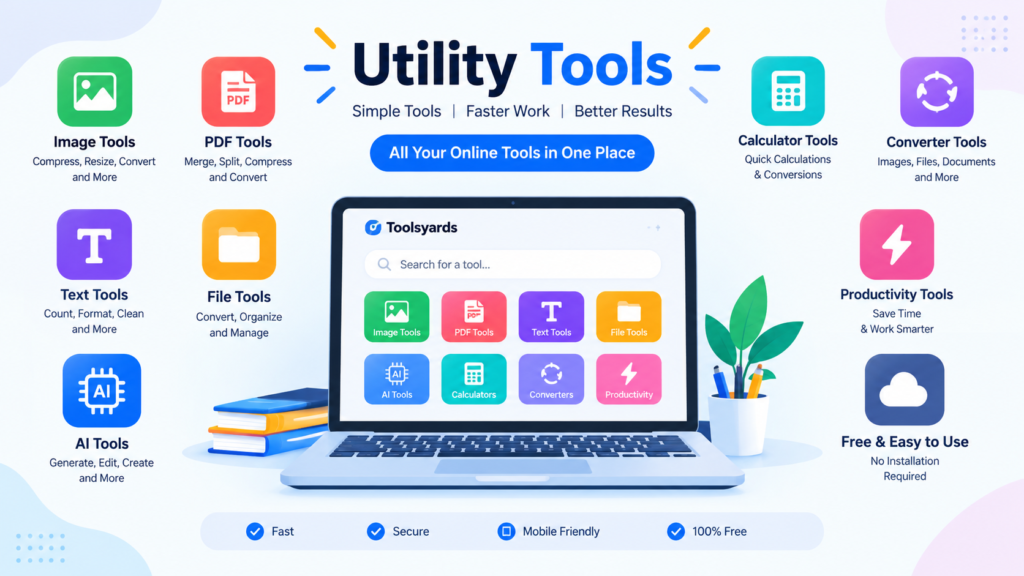
For example, Toolsyards can organize utilities into categories such as:
Image Tools
Tools for resizing, compressing, cropping, converting, and optimizing images.
AI Tools
Tools for generating and transforming AI-powered content.
PDF Tools
Utilities for managing, converting, compressing, and organizing PDF documents.
Text Tools
Tools for counting, formatting, cleaning, and transforming text.
File Tools
Utilities for converting and processing different file types.
Productivity Tools
Calculators, converters, and other tools that help with everyday tasks.
Good categorization helps users reach the right tool faster.
How Toolsyards Can Help
Toolsyards is built around the idea of an online digital toolbox.
Instead of treating every small digital task as a separate problem, users can explore different tools from one platform.
For example, someone working on a blog might use an image compressor, word counter, and image converter.
Another user might need a PDF utility and a file conversion tool.
The needs are different, but the basic idea remains the same: make everyday online tasks easier.
Tips for Getting Better Results
Online tools are convenient, but users should still check their results.
Check Image Quality
After compressing or converting an image, zoom in and make sure important details have not been lost.
Check File Format
Before downloading a converted file, make sure the output format is suitable for the website or application where you plan to use it.
Check Text Results
If you use a text-processing tool, review the output before publishing or submitting it.
Protect Sensitive Information
Don’t upload confidential documents simply because a tool is convenient. Think about what information the file contains before using an online service.
Frequently Asked Questions
What is an online utility tool?
An online utility tool is a web-based application designed to perform a specific digital task, such as converting files, editing images, counting words, or processing documents.
Are online utility tools difficult to use?
Most basic utilities are designed to be simple. Many require only a few steps, such as uploading a file and selecting an option.
Can online utility tools save time?
Yes. They can reduce the need for installing and learning separate software for small, specific tasks.
What are the most common online utility tools?
Common categories include image tools, PDF tools, text tools, file converters, calculators, productivity tools, and AI-powered utilities.
Can I use these tools on my phone?
Many browser-based tools can be accessed from smartphones and tablets, provided the website has a mobile-friendly interface.
Conclusion
The internet is full of small tasks that don’t always require complicated software.
Online utility tools provide quick solutions for these everyday problems. From image compression and file conversion to word counting, PDF processing, and AI-powered creation, different utilities can support different types of work.
The key is to choose the right tool for the job and always check the final result.
As more digital work moves online, simple browser-based utilities can become an important part of everyday workflows. Platforms like Toolsyards bring these different utilities together, giving users one place to explore practical tools for images, text, files, PDFs, AI, and productivity.